
Uploading Data
Standardised File Naming
v stands for version so we will know if there is a newer version of the same file i.e. v_1 vs v_2
•All country diagnostic data:
<country>_all_<YYYY_MM_DD>_v_<n>.csv.gz
Full refresh per country – include all data for country including new data
•All Hospital information data:
<country>_hospitals_all_<YYYY_MM_DD>_v_<n>.csv.gz
Full refresh of hospitals per country – include all data for hospitals including new data
S3 Login Credentials
You will received your S3 login credentials from Diaceutics in the form of the following:
Username:
AKIASSGAMXJ6XMZ2JDEP
Password:
abc_xyz
Bucket name:
dali-transfer-dtr-023-ew1-dxrx-com
IAM username:
dali-data-transfer
S3 Location Requirements
Save files in specific folder in S3
•Country files to be saved in:
s3://dali-transfer-dtr-023-ew1-dxrx-com/europe/
•Hospital files to be saved in:
s3://dali-transfer-dtr-023-ew1-dxrx-com/hospitals/
WinSCP File Transfer Utility
Download and install WinSCP from URL:
https://winscp.net/eng/download.php
WinSCP Configuration
Select New Site from the login manager
Change the File Protocol to Amazon S3
Fill in the Access key ID: and Secret access key: with your provided credentials
Click on advance button
Under Environment select Directories
In the field called Remote directory: enter the directory i.e. /dali-transfer-dtr-023-ew1-dxrx-com/ Note this is a slightly modified version of the provided directory s3://dali-transfer-dtr-023-ew1-dxrx-com/
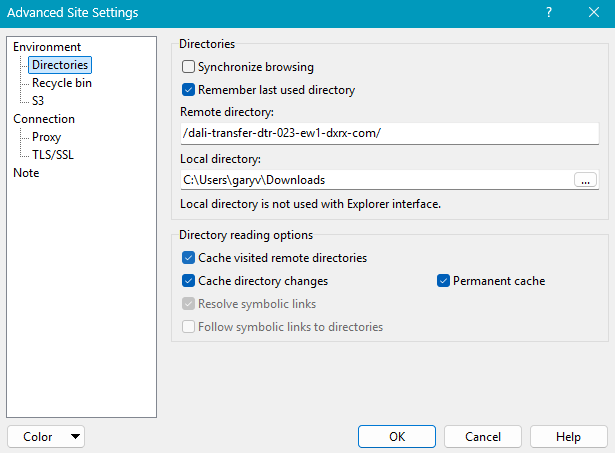
Click OK to the above and and then save the configuration so the login manager will look something like:
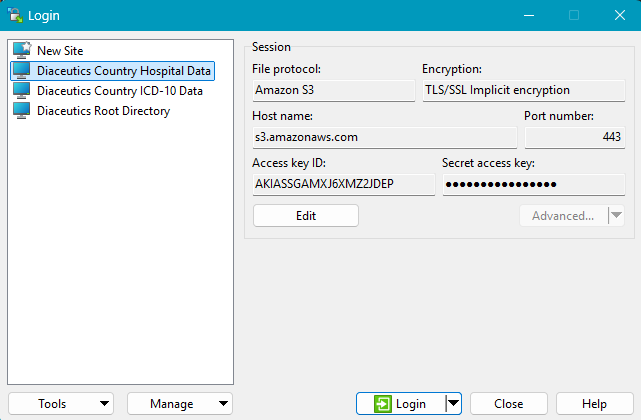
That's all there is to it.
Topic last reviewed: 26/07/25