
Processing Steps v1 2025
French Diagnostics become fully available in June for example year 2024 data will be available in June 2025 and not before.
Required MySQL lookup/reference tables (prerequisite and mandatory):
0_finess_serial - Finess to serial mapping
0_icd10_correction - Mapping for French ICD-10 version to PX ICD-10s
0_map_france - Contains the French regions
finess_icd10_cases - Will be the major table and requires little modification: only deduplication
finess_racine_cases - This is used in creation of the small cases
racine_icd10_cases - This builds the distribution frequencies
And need to create 3 extra MySQL tables:
0_racine_icd10_distribution_frequencies
minor - finess , code and cases
temp - code (only)
Note! Recommended column structures are:
finess should be setup as a VARCHAR 10 column
code should be setup as a VARCHAR 10 column
cases should be setup as a INT column
Warning! The French small case policy as of 2025 is no codes of <11 cases are supplied.
Note!
French official source of information:
Select Activité
Select Activité établissement - Casemix MCO
Select Activité MCO in the section half way down the page:

Takes you to this website which has a direct URL of: https://activite-mco.scansante.fr/activite-mco/ and looks something like this:
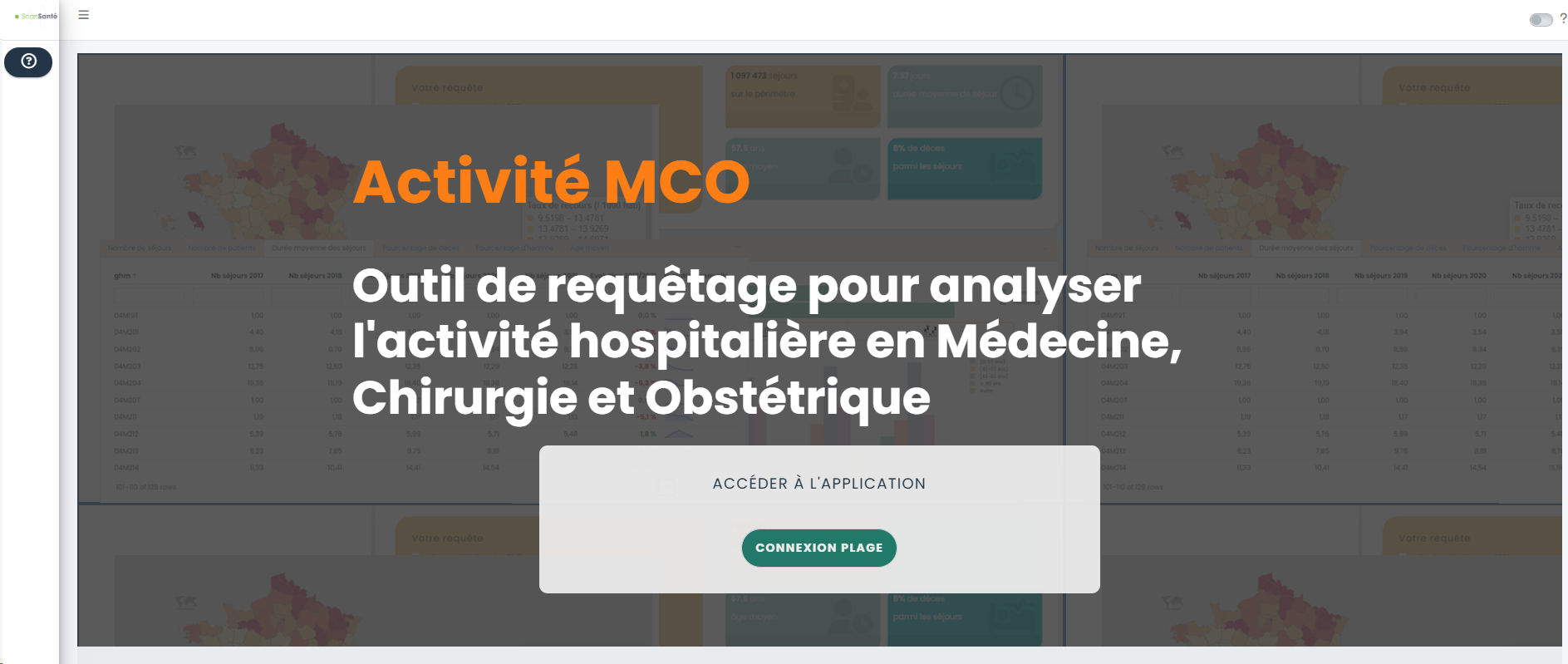
Select CONNEXION PLAGE
In the box Identifiant Plage enter: 528365
In box Mot de passe enter: PurpleWalnutFrance#99
Click on SE CONNECTER
Accept the cookies
Takes you to the configurator webpage
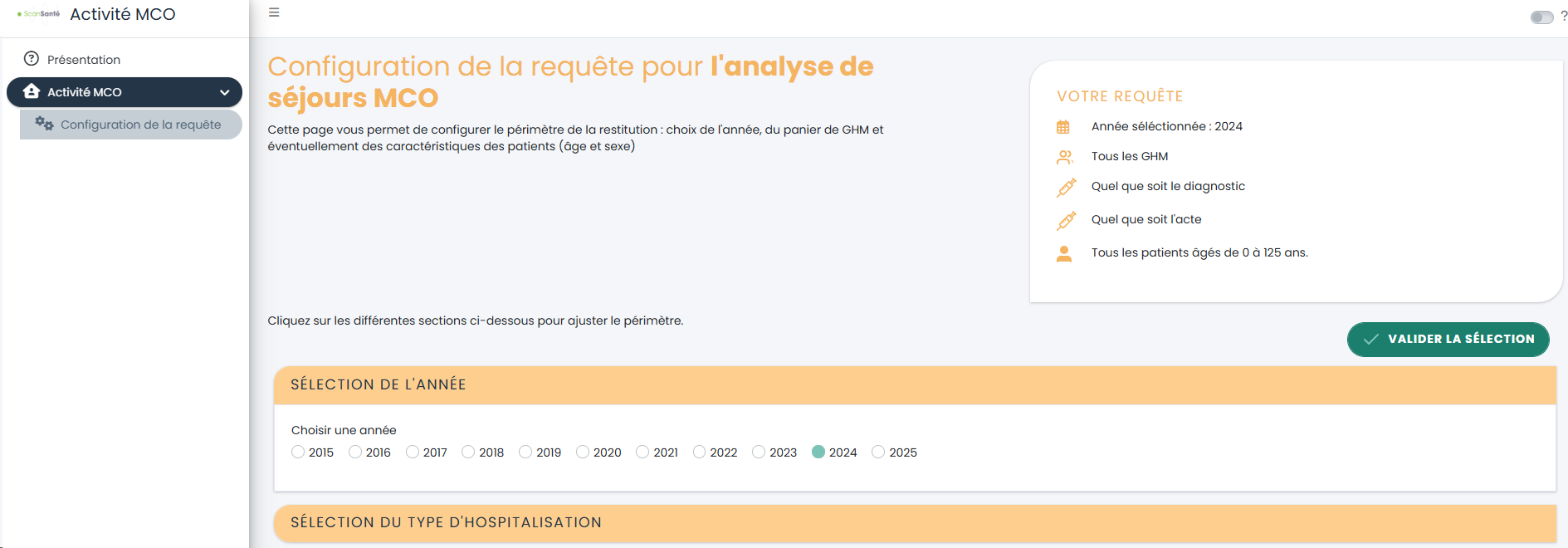
Select your year and click on VALIDER LA SÉLECTION
Scroll down a little and select CONFIGURER LA REQUÊTER and select the items in orange text
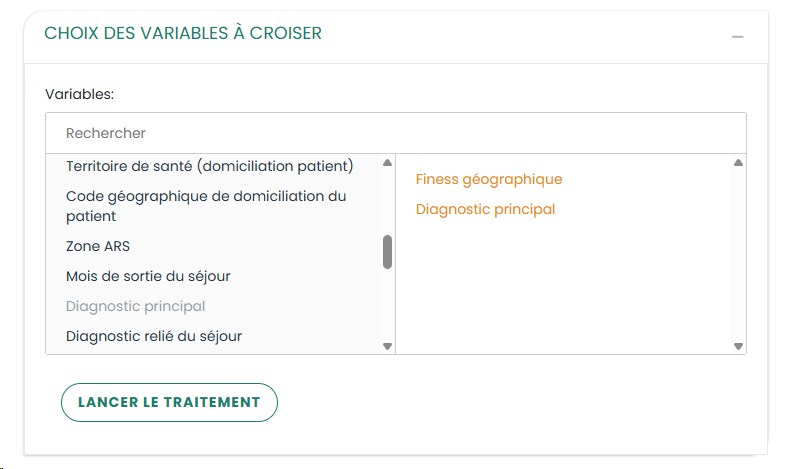
Will then provided you with the configuration box where you select the reporting parameters. It's called:
Choix des variables à croiser
After select the parameters
An extra line appears from and to:
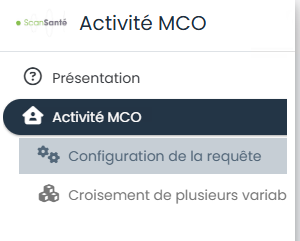
Click on:
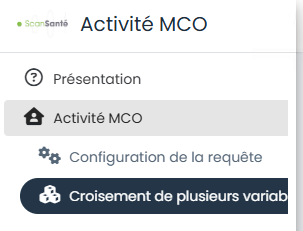
When screen refreshes download the spreadsheet by clicking on TÉCÉHARGEMENT EXCEL. Can can a while to generate especially for large reports so be patient and wait.
Rename the downloaded Excel file to major.xlxs. This table content is very accurate data which we will use as contains the hospital French serial (Finess géographique) with ICD-10 code and cases.
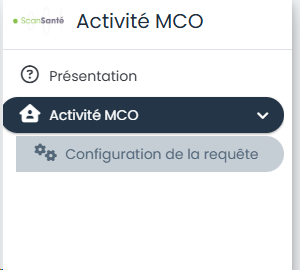
Then reset this reporting tool by selecting on the left Configuration de la requête now in light grey.
Repeat the above this time selecting a different customisation set of data parameters to report on:
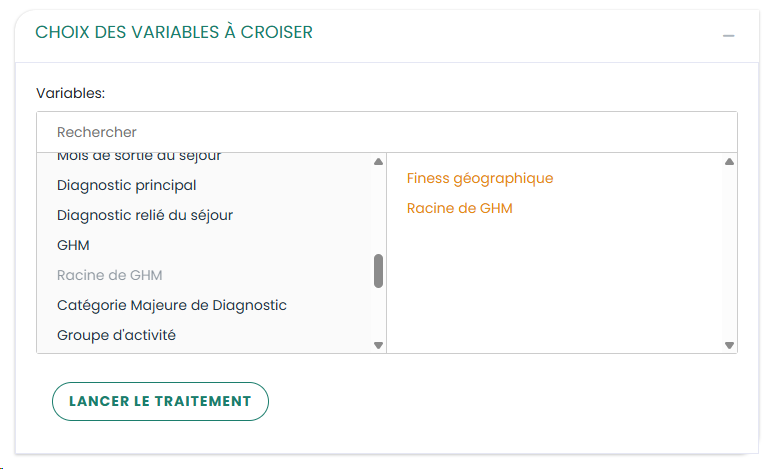
Rename this Excel file finess_racine_cases.xlxs
Repeat above forthe final dataset:
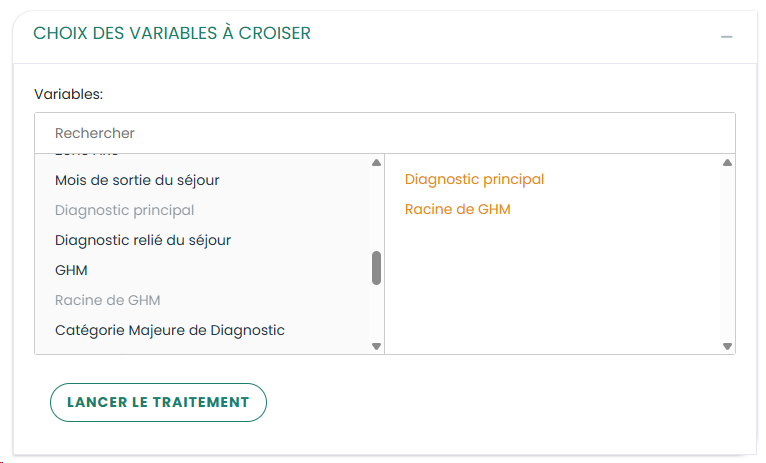
Download the Excel file. This is used to build the frequency table in order to generate the <11 codes / cases. Rename the downloaded file to racine_icd10_cases.xlxs
You end up with 3 Excel files:
major.xlxs - Contains Finess, ICD-10 and cases, however excludes cases >11
finess_racine_cases.xlxs - Contains Finess, Racine and cases, however excludes cases >11
racine_icd10_cases.xlxs - Contains Racine, ICD-10 and cases, however excludes cases >11. This data is intended to generate the distribution frequency table utilised to calculate cases of <11.
The next stage is to clean up the spreadsheets.
•Delete the first row which often contains the test "mco.activiteActivité MCO"
•Delete the second row if the cells it contain "Autres - Agrégé pour préserver le secret statistique".This row identifies the total number of cases that are associated with codes appearing in fewer than 11 cases, in line with the French small case policy. At the moment we are unable to utilise this data.
•Remove the unwanted columns to leave just 3 columns which is table column dependant
•Remove the thousands separator (spaces) in the Effectif column
•Rename column headers to single, lowercase words e.g. finess, racine, code and cases
•Clean up the Finess and code columns
•Remove the Finess serials starting from 97 onwards as these are overseas hospitals. Tip - Sort worksheet by finess and then search the column for "970"
Convert the spreadsheets to CSV and import them into WampServer.
Deduplicate the major table. Remember! Contains columns finess, code and cases
CREATE TABLE temp_table AS
SELECT finess, code, cases
FROM major
GROUP BY finess, code, cases;
DELETE FROM major;
INSERT INTO major (finess, code, cases)
SELECT finess, code, cases FROM temp_table;
DROP TABLE temp_table;
Then use the same SQL queries to deduplicate the finess_racine_cases table
CREATE TABLE temp_table AS
SELECT finess, racine, cases
FROM finess_racine_cases
GROUP BY finess, racine, cases;
DELETE FROM finess_racine_cases;
INSERT INTO finess_racine_cases (finess, racine, cases)
SELECT finess, racine, cases FROM temp_table;
DROP TABLE temp_table;
Populate the minor table by running a PHP file called diag_distribution v0.1.php
Note! The following number are all approximations
Remove code range R to Z from final the minor table 700,000 rows (SELECT COUNT(*) AS total FROM `minor org` WHERE `code` REGEXP '^[R-Z]';), leaving 2,000,000 from 3,000,000.
DELETE FROM `minor` WHERE `code` REGEXP '^[R-Z]';
Remove from table cases that are greater than 10, leaving 2,000,000. Removes 260,000 rows.
DELETE FROM `minor` WHERE `cases` > 10;
Deduplicate summing the cases leaving one unique entry for finess and code because the Racines contain ICD-10 that overlap.
CREATE TABLE temp_table AS
SELECT finess, code, SUM(`cases`) AS `cases`
FROM minor
GROUP BY finess, code;
DELETE FROM minor;
INSERT INTO minor (finess, code, cases)
SELECT finess, code, cases FROM temp_table;
DROP TABLE temp_table;
Make a copy of the major table called final consisting of 250,000 rows (SELECT COUNT(*) AS total_row_count FROM `final`;).
Modify the structure of the finess and code columns as you may end up receiving the follwoing phpMyAdmin error:
#1071 - Specified key was too long; max key length is 1000 bytes
ALTER TABLE `final`
MODIFY `finess` VARCHAR(10),
MODIFY `code` VARCHAR(10);
Remove code range R to Z from the final table. Removes 60,000 rows leaving 190,000. (SELECT COUNT(*) AS total_row_count FROM `final`;).
DELETE FROM `final` WHERE `code` REGEXP '^[R-Z]';
Insert minor table content into the final table only where the code does not exist in the final table which will be 2,000,000 (SELECT COUNT(*) AS total_over_10 FROM `minor`;)
Before preceding add indexes on both the minor and final tables:
ALTER TABLE `final` ADD UNIQUE KEY `idx_final_finess_code` (`finess`, `code`);
-- helps source-side dedup / lookups:
CREATE INDEX `idx_minor_finess_code` ON `minor` (`finess`, `code`);
-- The SQL query will insert rows from minor into final only when the (finess, code) pair doesn’t already exist in final:
INSERT INTO `final` (`finess`, `code`, `cases`)
SELECT m.`finess`, m.`code`, m.`cases`
FROM `minor` AS m
WHERE NOT EXISTS (
SELECT 1 FROM `final` f
WHERE f.`code` = m.`code` AND f.`finess` = m.`finess`
);
The above will insert rows from minor into final only when the (finess, code) pair doesn’t already exist in final.
⚠️ Warning! Will fail if any duplicates in the minor table are found, for example: #1062 - Duplicate entry '020000162-A000' for key 'uk_final_finess_code'
~1,100,000 gets inserted in the final table out of 1,200,000 and ~100,000 don't get inserted because the (finess, code) pair already exist in the final table.
🔥 Important: Review the final table for any duplicate finess/codes. If duplicates are identified, it indicates an error in the process; restart the process again. Row count ~1,363,793 (SELECT COUNT(*) AS total FROM `final`;)
SELECT
`finess`,
`code`,
COUNT(*) AS duplicate_count
FROM `final`
GROUP BY `finess`, `code`
HAVING COUNT(*) > 1
ORDER BY duplicate_count DESC;
Remember to remove indexes
-- Drop the UNIQUE key from the 'final' table
ALTER TABLE `final` DROP INDEX `idx_final_finess_code`;
-- Drop the regular index from the 'minor' table
ALTER TABLE `minor` DROP INDEX `idx_minor_finess_code`;
Align codes with PX codes. ~25,000 will be aligned
-- Add indexes
CREATE INDEX idx_final_code ON final (code);
CREATE INDEX idx_icd10_correction_code ON icd10_correction (code);
-- Update
UPDATE final AS t1
LEFT JOIN icd10_correction AS t2
ON t1.code = t2.code
SET t1.code = COALESCE(t2.replacement, t1.code);
-- Drop index from 'final' table
ALTER TABLE `final` DROP INDEX `idx_final_code`;
-- Drop index from 'icd10_correction' table
ALTER TABLE `icd10_correction` DROP INDEX `idx_icd10_correction_code`;
Depulicate the final table as now there will some due to the above process or can process using Duplicate table entry processing v0.1.php
CREATE TABLE temp_table AS
SELECT finess, code, SUM(`cases`) AS `cases`
FROM final
GROUP BY finess, code;
DELETE FROM final;
INSERT INTO final (finess, code, cases)
SELECT finess, code, cases FROM temp_table;
DROP TABLE temp_table;
Leaves ~ 1,300,000 rows (SELECT COUNT(*) AS total FROM `final`;)
Insert a new column called serial with a structure = INT
-- Add serial column after finess
ALTER TABLE `final` ADD COLUMN `serial` INT AFTER `finess`;
-- Add indexes
CREATE INDEX idx_final_finess ON `final` (`finess`);
-- Populate the serial column
UPDATE `final` AS f
INNER JOIN `finess_serial` AS fs
ON f.`finess` = fs.`finess`
SET f.`serial` = fs.`serial`;
-- Drop index from the 'final' table
ALTER TABLE `final` DROP INDEX `idx_final_finess`;
Remove unwanted establishments by using their Geo Finess
- Run Step 0 - Strip Unwanted Finesses v0.1.php, but insure the following reference tables are included in your database.
•0_national_establishments (Retreived from French website: https://www.data.gouv.fr/datasets/finess-extraction-du-fichier-des-etablissements/)
•0_reference_unwanted_finesses
•0_reference_unwanted_establishment_word_list
•0_reference_unwanted_establishments_categories
Creates a table called: 0_national_establishments_wanted
-- Delete Finess along with associated data from the final table:
DELETE FROM `final`
WHERE `finess` NOT IN (
SELECT `nofinesset_individual`
FROM `0_national_establishments_wanted`
);
-- Check for any blank serial cells:
SELECT DISTINCT `finess`
FROM `final`
WHERE `serial` IS NULL;
Add and populate the region column from PX hospital table
-- Add region column after serial
ALTER TABLE `final`
ADD COLUMN `region` VARCHAR(50)
COLLATE utf8mb4_unicode_ci
NOT NULL
AFTER `serial`;
-- Index serial column in final table
CREATE INDEX idx_serial ON `final` (`serial`);
-- Update final table region using ammap region code
UPDATE `final` AS a
JOIN `0_reference_hospitals_purplextra_db` AS b
ON a.`serial` = b.`serial`
SET a.`region` = b.`ammap_region`;
-- Drop index from the final table
ALTER TABLE `final` DROP INDEX `idx_serial`;
-- Check for any blank serial cells:
SELECT DISTINCT `serial`
FROM `final`
WHERE `region`='';
Fix any blank region cells
-- Populate final table region column with full French region name
UPDATE `final` AS a
JOIN `0_map_france` AS b
ON a.`region` = b.`ammap_region`
SET a.`region` = b.`new_px_region`;
-- Check there are 13 regions in final table
SELECT DISTINCT `region`
FROM `final`;
-- Check for any blank region cells. There should be none.
SELECT DISTINCT `region`
FROM `final`
WHERE `region`='';
Add and populate a year column
-- Add year
ALTER TABLE `final`
ADD COLUMN `year` YEAR
FIRST;
-- Populate the column
UPDATE `final`
SET `year` = 2022; -- 👈 Change this to the year you want
Deduplicate the final table
CREATE TABLE `final_deduped` AS
SELECT
`year`,
`serial`,
`region`,
`code`,
SUM(`cases`) AS `cases`
FROM `final`
GROUP BY
`year`,
`serial`,
`region`,
`code`;
Then index each column individually.
💡 Carry final check by checking:
•Code range A to Q inclusive
•Max code / cases sort
•Blank cell search
•Count rows and compare with previous years
•Count number of hospitals and compare with previous years
Topic last reviewed: 05/11/25