
Optimising Data for Client
Aligning PurpleXtra’s Data Structure with Diaceutics Standards
Prerequisite
Initially, two tables are needed and can be accessed from the purple66_purplextra database hosted on Hostinger.
•diag_spain_all - Sourced from the live operational database purple66_purplextra, hosted on Hostinger.
•hospitals_spain - Sourced from the live operational database purple66_purplextra, hosted on Hostinger. This provides a comprehensive directory of all PurpleXtra hospitals.
•0_master_hospital_directory_from_px_pb - This table contains our complete set of hospital records, whereas the hospitals_spain table may be outdated and therefore requires synchronization with the master hospital directory.
•country_id - Maps the country to it's correspond ID.
While the diag_spain table includes data solely for the current year, therefore is not required.
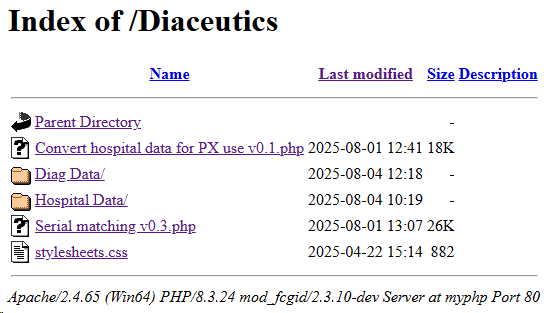
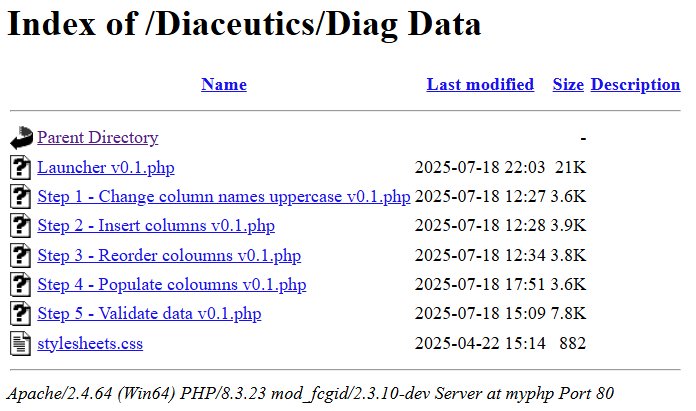
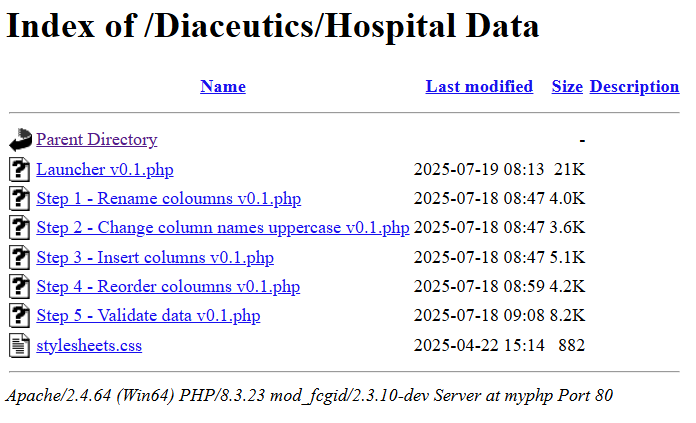
Require also are the PHP script files to run, example of screenshots can be found below:
Note! The file names and versions may change due to enhancements to the codebase.
Preparing Each Dataset
Notes!
•Every Diaceutics subfolder includes a for example Launcher v0.3.php file (execute the latest version) and is designed to execute all steps within its directory. Be sure to run this file.
•The Launcher program will prompt you to specify the MySQL database and the country you’re working with. These selections are used to assign the $dbname and $country variables, which are defined near the beginning of the script.
•As each PHP file runs, it will show its progress and highlight any errors it encounters. Keep an eye out for these and fix them manually if necessary.
Processing the Diagnostic Data
1. Run Launcher v0.3.php from the /Diaceutics/Diag Data PHP directory and takes <10 minutes to complete (using an Intel i7 processor).
2.Once completed, correct any errors reported by the PHP script.
Tip: From the browser search for the word "error" and check for any red crosses.
3. Then manually fill in any remaining blank columns in the final (step 5) tables. When you're working with large tables (e.g., 10 million rows), it's easier and faster to run direct SQL queries from the phpMyAdmin SQL tab. Here's one way to do that:
○Populate diagnosis table CODE_3 column (5 million rows takes ~5 mins with an Intel i7 processor)
UPDATE `step_5_diag_united_kingdom_all` SET `CODE_3` = LEFT(`CODE`, 3);
○Add the country to all rows in the column (20 mins with an Intel i7 processor)
UPDATE `step_5_diag_united_kingdom_all` SET `COUNTRY`='FR';
Processing the Hospital Data
1.Run Launcher v0.3.php from the /Diaceutics/Hospital Data PHP directory and takes <7 minutes to complete (using an Intel i7 processor).
2.Populate the hospitals table
Need to use this SQL query to update the country and region codes from the `0_master_hospital_directory_from_px_pb` database. The last command ensures the correct country is selected otherwise incorrect codes will be assigned.
update the country
UPDATE `step_5_hospitals_united_kingdom` SET `AMMAP_ID` = 'GB';
And
UPDATE `step_5_hospitals_united_kingdom`, `0_master_hospital_directory_from_px_pb`
SET
`step_5_hospitals_united_kingdom`.`AMMAP_REGION` = `0_master_hospital_directory_from_px_pb`.`ammap_region`
WHERE
`step_5_hospitals_united_kingdom`.`serial` = `0_master_hospital_directory_from_px_pb`.`serial`;
or
UPDATE `step_5_hospitals_united_kingdom`, `0_master_hospital_directory_from_px_pb`
SET
`step_5_hospitals_united_kingdom`.`AMMAP_REGION` = `0_master_hospital_directory_from_px_pb`.`ammap_region`,
`step_5_hospitals_united_kingdom`.`AMMAP_ID` = `0_master_hospital_directory_from_px_pb`.`ammap_id`
WHERE
`step_5_hospitals_united_kingdom`.`region` = `0_master_hospital_directory_from_px_pb`.`region`
AND
`step_5_hospitals_united_kingdom`.`AMMAP_REGION` = ''
AND
`0_master_hospital_directory_from_px_pb`.`ammap_id` = 'GB';
Generate the Final Tables (the Hospital Table is for internal use within the purple66_purplextra database)
Finally run Launcher v0.1.php from the /Diaceutics directory and takes ~10 minutes to complete (using an Intel i7 processor). This will ask for the following information:
•Confirmation of the MySQL database you are modifying
•The country you are working on
•Requires the today's or any other date which is used to produce the final two Diaceutic tables
The script performs the following two tasks:
1.Executes the STEP 1 - Serial bidirectional matching v0.3.php script located in the root Diaceutics directory. This action ensures that PurpleXtra serials are correctly aligned between the two (Step 5) files: one with ICD-10 coding / cases, and the other with hospital information. Generates Diaceutic tables: united_kingdom_hospitals_all_yyyy_mm_dd_v_1 and united_kingdom_all_yyyy_mm_dd_v_1
2.Executes STEP 2 - Convert hospital data for PX use v0.2.php. This generates the hospital table for use in the purple66_purplextra database on Hostinger by executing the script. This cconverts the hospital data for PX use v0.1.php and outputs a table called hospitals_united_kingdom which is for our own use and should be uploaded to the live PX database on Hostinger.
Export the MySQL Tables
To export MySQL tables, see the Help Manual section: phpMyAdmin Exporting a MySQL DB or Table
Topic last reviewed: 26/01/26