
Jap to PX Serial
Open previously downloaded 2024_group08_mdc01.xlsx and save as facilities.xlxs
Translate spreadsheet using Google translation service: https://translate.google.co.uk/?hl=en&tab=wT&sl=ja&tl=en&op=docs
Save and reopen the translated spreadsheet
Delete all columns after the Facility name
Rename Facility name to just name
Delete rows 1 to 3 which leaves a column header
Rename column headers Notification number to number_xx where xx is the two digit current year and Serial number to number_xx where xx is the two digit last year.
Save as CSV called 0_serial and import into WampServer:
Check the number_xx column contain a 6 digit number and if not check either the spreadsheet save process has dropped a leading zero.
SELECT *
FROM `0_serial`
WHERE CHAR_LENGTH(`number_24`) != 5
OR (`number_23` != '-' AND CHAR_LENGTH(`number_23`) != 5);
Populate the serial column:
UPDATE `0_serial` s
JOIN `0hospitals_japan_years_hostinger` h
ON s.`number_23` = h.`number_23`
SET s.`serial` = h.`serial`;
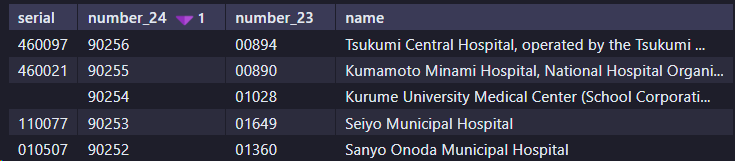
You will end up with a table looking something like:
Structure

And
Remove the unwanted facilities
Topic last reviewed: 01/04/26