
DPC to ICD-10 Frequency Table
Building the DPC to ICD-10 Frequency Table
Note 1: All data is sourced from the Japanese government website. The DPC-to-ICD-10 mapping includes only a limited set of ICD-10 codes, which is why the Japanese dataset contains fewer rows compared to other countries, such as Germany.
Note 2: A new frequency distribution table must be created for each year as it is a mandatory requirement to have the distribution data for that specific year.
DPC to ICD Conversion Process
Translate all Japanese website pages automatically
Fetch the latest spreadsheet goto URL and from there select
https://www.mhlw.go.jp/stf/shingi/shingi-chuo_128164.html
Look for the text contained in table header Agenda etc for: Regarding the report on the results of the "Discharged Patient Survey", a survey related to the impact evaluation of the introduction of DPC in 2023
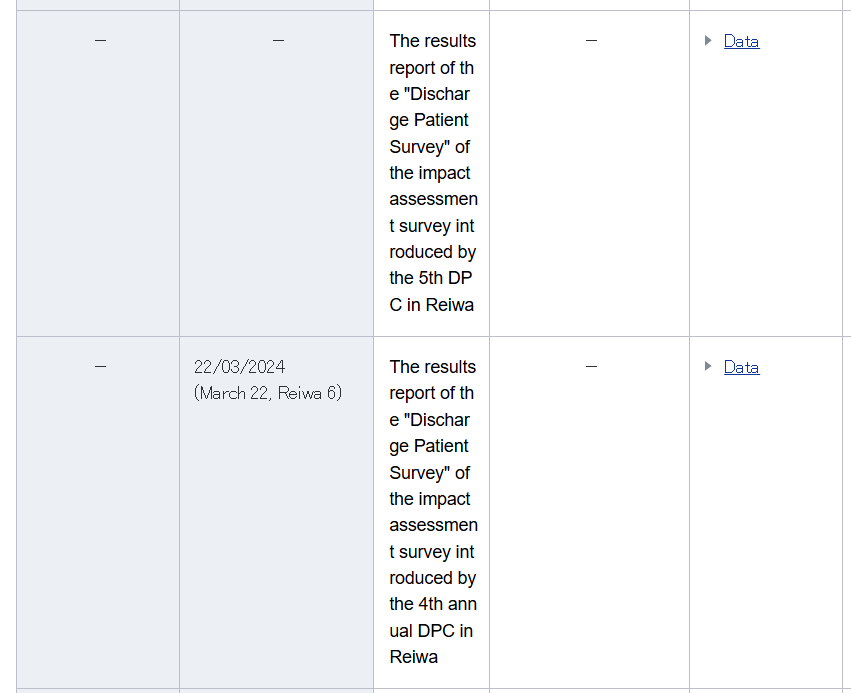
Then from the column titled Information etc click on the link called Data and it will take you to the latest data webpage. Ensure you select the correct year where the second column is occupied and not the most current which has a "-".
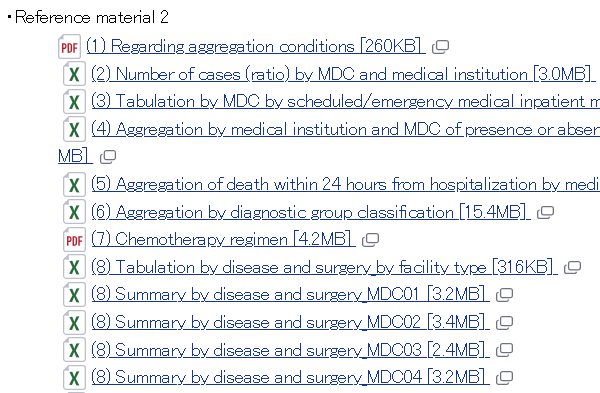
Select spreadsheet 6 (Aggregation by diagnostic group classification) from section called ·Reference 2
Once downloaded translate the spreadsheet using the service provided by Google: https://translate.google.co.uk/?hl=en&tab=wT&sl=ja&tl=en&op=translate
Note! Google translating service will not translate documents over 10MB and you will receive the following pop up messaged:

The work around is to open the Excel spreadsheet and you'll notice there are several work sheets, delete all except the one named 全体 (which means overall) and this reduces size of the spreadsheet by a fifth. Then try again.
Once translated carry out the following steps to import into WampServer:
1.Using CRTL-F on the first row which has a header of something like Diagnostic group classification number search for any spaces as there should be none and if any are found fix the issue by studying the spreadsheet. For example:
There is a DPC with corruption 1800 1x0xxx3xx amend to 180010x0xxx3xx
2.Add column to strip using Excel formula to 1st 6 number, which includes the leading zero so be careful not to lose.
○Change the column format to General
○Give the column a header name of dpc
○Enter in cell A4 formula =LEFT(B4,6) and copy down column A cells to end of the data. The column automatically update with the 6 digit DPC.
○Click on the cell A4 and select all column A cells down to end of the data
○Use CTRL C to copy the data
○From the Paste pull down icon on the menu select Paste 123 (values) only
3.Strip unwanted columns as need medical resource columns (Medical Resources ICD10_xx) with ICD 10 plus case columns.also take out co-morbidities which are secondary.
4.you should end up with DPCs to ICD10s with cases, which were found spreadsheet header under header medical resources .
5.Clean up headers:
○delete the header rows
○insert new header
○call them dpc, code_1, cases_1, etc. up to code_10 and cases_10
6.Save as CSV and import into WampServer and call the table source_table
7.Create SQL new table called new_table with the following columns:
○dpc VARCHAR(7) - would be 6 but one more to be safe so it's 7
○code VARCHAR(5) - would be 5 but one more to be safe so it's 5
○cases VARCHAR(10) - this is due to the thousands separator used by the Japanese
8.Insert enter into the new table dpc, code_1 and cases_1 and then repeat for dpc, code_2, cases_2 and so on until dpc, code_10, cases_10. here's the SQL query:
INSERT INTO `new_table`(`dpc`, `code`, `cases`) SELECT `dpc`, `code_1`, `cases_1` FROM `source_table`;
INSERT INTO `new_table`(`dpc`, `code`, `cases`) SELECT `dpc`, `code_2`, `cases_2` FROM `source_table`;
INSERT INTO `new_table`(`dpc`, `code`, `cases`) SELECT `dpc`, `code_3`, `cases_3` FROM `source_table`;
INSERT INTO `new_table`(`dpc`, `code`, `cases`) SELECT `dpc`, `code_4`, `cases_4` FROM `source_table`;
INSERT INTO `new_table`(`dpc`, `code`, `cases`) SELECT `dpc`, `code_5`, `cases_5` FROM `source_table`;
INSERT INTO `new_table`(`dpc`, `code`, `cases`) SELECT `dpc`, `code_6`, `cases_6` FROM `source_table`;
INSERT INTO `new_table`(`dpc`, `code`, `cases`) SELECT `dpc`, `code_7`, `cases_7` FROM `source_table`;
INSERT INTO `new_table`(`dpc`, `code`, `cases`) SELECT `dpc`, `code_8`, `cases_8` FROM `source_table`;
INSERT INTO `new_table`(`dpc`, `code`, `cases`) SELECT `dpc`, `code_9`, `cases_9` FROM `source_table`;
INSERT INTO `new_table`(`dpc`, `code`, `cases`) SELECT `dpc`, `code_10`, `cases_10` FROM `source_table`;
9.Remove the blank codes:
DELETE FROM `new_table` WHERE `code`='';
10.Check and correct for any anomolyes in the codes by sorting as 0000 (4 zeros) is O000 and 0600 is O600.
UPDATE `new_table` SET `code`='O000' WHERE `code`='0000';
UPDATE `new_table` SET `code`='O600' WHERE `code`='0600';
11.Check that all DPC values are 6 characters long:
SELECT
MIN(CHAR_LENGTH(`dpc`)) AS min_code_length,
MAX(CHAR_LENGTH(`dpc`)) AS max_code_length
FROM `new_table`;
12.Remove the thousands separator comma or a period which is used by many European countries:
UPDATE `new_table` SET `cases` = REPLACE(`cases`, ',', '');
UPDATE `new_table` SET `cases` = REPLACE(`cases`, '.', '');
13.Change the cases structure from VARCHAR to INT
14.Create a new table named dpc_to_icd10_distribution with a structure based solely on the existing table to prepare for handling duplicate entries.
15.Process duplicates:
INSERT INTO `dpc_to_icd10_distribution`(`dpc`, `code`, `cases`) SELECT `dpc`, `code`, SUM(`cases`) FROM `new_table` GROUP BY `dpc`, `code`;
16.Add two columns after cases called start and end with a column structure of DECIMAL(9,8).
17.Use this MySQL query to identify any duplicate dpc and code combinations, as none should exist:
SELECT
dpc,
code,
COUNT(*) AS duplicate_count
FROM dpc_to_icd10_distribution
GROUP BY dpc, code
HAVING COUNT(*) > 1
ORDER BY duplicate_count DESC, dpc, code;
18.The last step in constructing the table involves running the PHP file named calculate_frequencies.php, which computes and fills in the start and end columns. Note! Remember to change the database name to the name you are using, which can be found in the PHP section // Connect to database
Topic last reviewed: 30/03/26